
Managing the election and funding of retirement accounts is an important administrative task for HR professionals. GoCo and Human Interest have partnered to offer a 360° 401(k) sync for embedded payroll customers that makes the task hands-off and worry-free by streamlining the payroll processes and ensuring that retirement accounts are funded consistently and accurately.
To set up the Human interest Integration please reach out to your client success team!
With our Human Interest integration:
-
GoCo will send Human Interest demographic data.
-
Human Interest uses this data to manage team member eligibility.
-
-
Human Interest will send GoCo member retirement deferral elections.
-
GoCo uses this data to ensure the deductions made in payroll match what your team members' elect in Human Interest.
-
-
GoCo will send Human Interest payroll data to fund Human Interest 401(k) accounts.
-
Human Interest uses this data to ensure your team members' accounts are funded based on what was deducted from payroll.
-
-
GoCo will send Human Interest a year-to-date funding report from payroll.
-
Human Interest uses this data to ensure accurate funding and keep your company and team members' compliant with retirement funding regulations.
-
Configuring Company Contributions
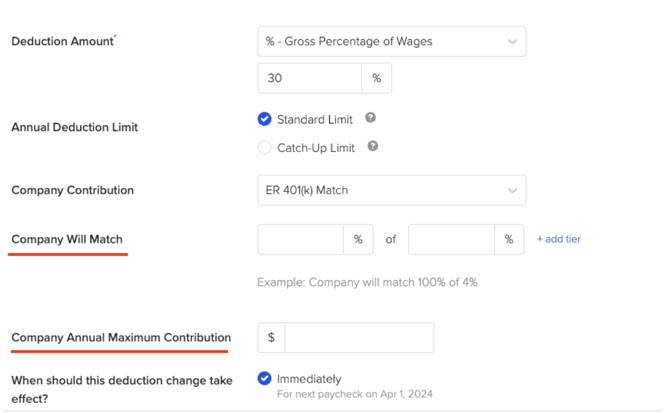
When deciding whether a company will contribute to retirement plans, Gusto embedded payroll users can establish company matching rules, which may include adding multiple tiers for contributions as well as a Company Annual Maximum Contribution.
Important: If your organization utilizes GoCo Embedded Payroll but does not have the active Human Interest Integration enabled, do not use the tiered company contribution settings. Instead, you must manually specify the exact flat percentage based on the expected result at the time you enter or update the employee deduction. Utilizing tiers without the integration sync can result in payroll calculation discrepancies.
Understanding Annual Deduction Limits
Within the deduction panel, users will notice an "Annual Deduction Limit" section. 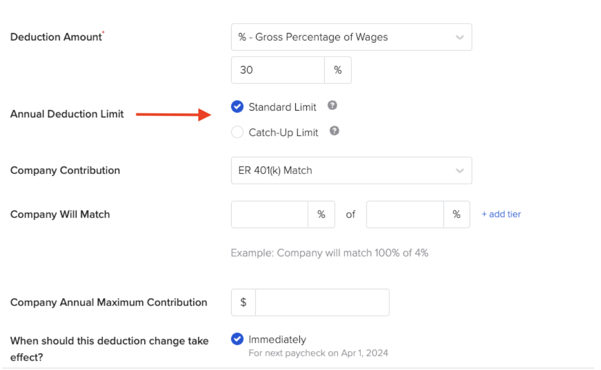
- Read-Only: This feature is set as read-only in GoCo because it is fully configured and managed directly through the Human Interest platform to prevent accidental overrides.
- IRS 2024 Standards: For your context, the standard limit is set at $23,000.
-
Catch-Up Limits: Employees who are 50 years old or older qualify for the catch-up limit of $30,500.
Loans
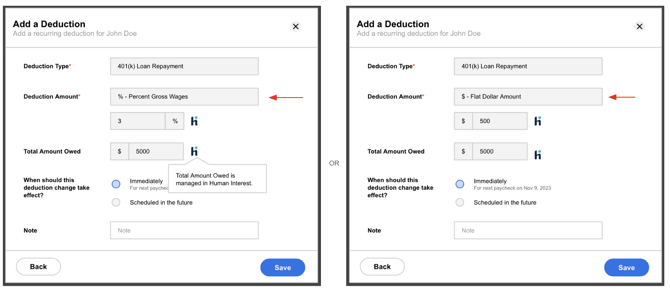
If an employee has an active 401(k) loan, you can adjust their loan payment amounts by a flat dollar amount or a percentage of gross wages. The "Total Amount Owed" must be configured directly within the Human Interest platform.
If you have Human Interest related questions check out their resource center
If you have additional questions please contact your Client Success Team or email us at support@goco.io 💚